
Blog
A Guide to Data Harmony and Efficient Bank Reconciliation
Learn how to streamline bank reconciliation processes and ensure financial accuracy with actionable tips and strategies.
Find the best bank reconciliation software for your setup. Compare accounting software with automated platforms, key features and evaluation criteria.

Nov 25, 2026

It’s the third day of the month-end. Someone on your finance team has the bank statement in one window and the general ledger in another, ticking off lines one by one. A $12,480 deposit doesn’t match anything. A card settlement landed net of fees. An ACH batch covers 300 payments, but the bank shows one line. Two hundred lines in, there are still eleven items nobody can explain. Sound familiar?
That’s the work bank reconciliation software is meant to take over. This guide explains what it does, how the bank rec feature in accounting software differs from automated bank reconciliation software, which features matter most, including AI recon agents, and how to compare your options.
There’s no single winner for every business. The best bank reconciliation software is the one that fits your volume and complexity.
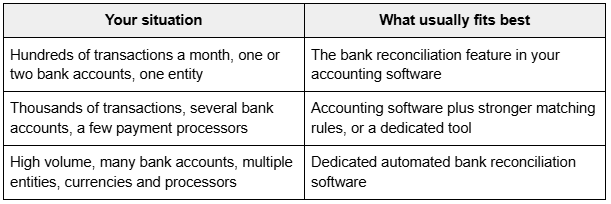
Three questions settle most decisions:
The higher your answers, the more you need a dedicated platform.
Bank reconciliation software compares your bank statement with your internal records and confirms they match. It brings in bank data, matches each transaction to a ledger entry and flags anything that doesn’t line up, such as outstanding checks, deposits in transit, bank fees, duplicates or missing entries.
Good software also records how each difference was resolved, so you have a clear audit trail at month-end. The newest platforms go further, with AI recon agents that investigate and resolve routine differences instead of only flagging them.
Bank reconciliation and payment reconciliation are closely related, but they address different parts of the financial reconciliation process.
Bank reconciliation verifies that transactions recorded in the accounting system match the transactions reported by the bank. It helps identify missing entries, duplicate transactions, outstanding payments, deposits in transit and other discrepancies.
Payment reconciliation goes a step further by tracing payments across the different systems involved in processing a transaction. This may include payment gateways, processors, card networks, settlement reports, bank accounts and the general ledger.
For example, a business may process 1,000 card transactions through a payment processor. The processor deducts fees and transfers the net settlement amount to the bank. The bank statement shows one deposit, while the internal system contains 1,000 of individual transactions.
A payment-aware reconciliation platform connects these records, validates the settlement amount, accounts for fees and identifies discrepancies before the final amount is reconciled with the bank and ledger.
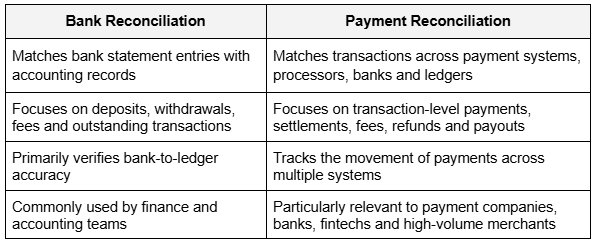
For businesses with straightforward banking activity, traditional bank reconciliation may be sufficient. Businesses managing complex payment flows often need both capabilities working together.
Most accounting software includes a bank reconciliation feature. Dedicated automated bank reconciliation software is a separate platform built for higher volume and complexity.
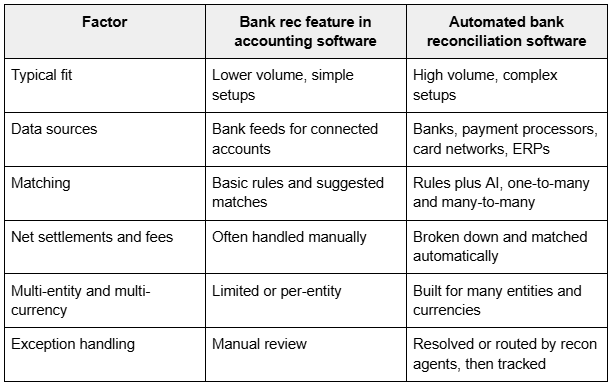
The key difference is the depth of reconciliation each system supports.
Accounting software generally focuses on maintaining accurate financial records and matching bank transactions with ledger entries. Dedicated automated reconciliation platforms are designed to handle more complex data relationships, including one-to-many and many-to-many matching across banks, processors, networks and internal systems.
For example, one bank deposit may represent hundreds of individual card transactions, less processing fees and refunds. A basic bank reconciliation feature may identify the deposit but require additional manual work to explain its components. A dedicated platform can connect the underlying transaction and settlement data to the bank entry and ledger.
This does not necessarily mean that a business needs to replace its accounting software. In many cases, a dedicated reconciliation platform works alongside the existing ERP or accounting system.
If you have a few bank accounts, one entity, clean references and a manageable number of transactions, your accounting software’s bank reconciliation feature will often do the job well.
You’ve likely outgrown it when:
The best bank reconciliation feature in accounting software is the one that matches your setup, not the one with the longest feature list. When you compare accounting tools, look for:
Even the strongest built-in feature has limits. Accounting software is built to keep the books, not to reconcile high volumes of payment data from many sources. If your bank deposits are made up of thousands of card or processor transactions, a dedicated automated platform usually works alongside your accounting software, not instead of it.
Automation, AI-powered matching and autonomous reconciliation are not the same thing. Each addresses a different part of the reconciliation workflow.
For example, if a bank deposit does not match the expected settlement amount, a matching engine may flag the difference. A recon agent can investigate the associated processor report, identify fees or refunds contributing to the difference, and resolve or escalate the exception based on the configured approval rules.
The distinction matters because matching a transaction is only one part of reconciliation. Finance teams also spend considerable time investigating why transactions do not match and determining how to resolve those differences.
Use this table to score each option from 1 to 5 against your own needs.
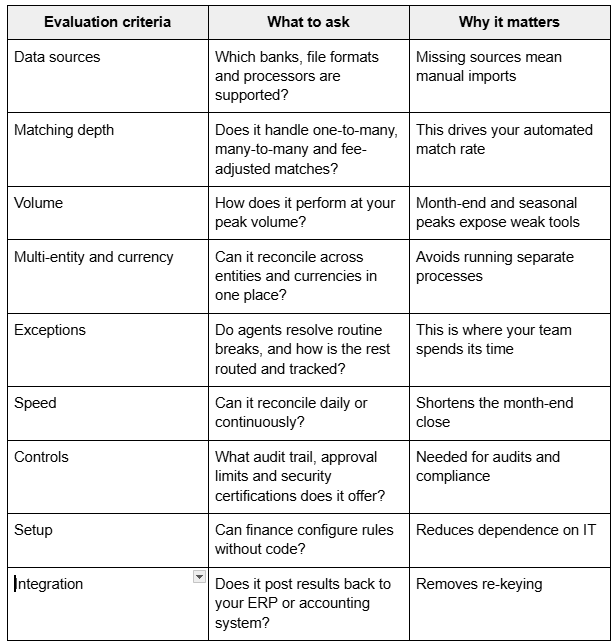
Money arrives through ACH, checks, wires, cards and real-time payments such as RTP and FedNow, and each rail sends different data in a different format. Bank reconciliation software has to read all of them and match them to the same ledger.
SSON research found that 86% of surveyed organizations still reconcile in spreadsheets, while 69% identified reconciliations as a major source of manual effort during the financial close.
These findings highlight the amount of manual work that remains in finance operations. Automated reconciliation software can reduce the effort involved in collecting data, matching transactions and investigating routine discrepancies.
A Gartner survey of 497 controllership professionals found that 18% of accountants reported making financial errors at least daily, while 59% reported making several errors each month.
The research also found a 75% reduction in financial errors among companies with high technology acceptance. That figure covers finance technology broadly, not reconciliation software alone.
As transaction volumes and the number of financial systems increase, finance teams need consistent matching rules, controlled workflows and reliable audit trails to maintain accuracy.
For banks, credit unions, payment companies and high-volume businesses, bank reconciliation can involve more than matching a bank statement against a general ledger. Finance teams may need to connect payment processor reports, card network files, settlement records, bank accounts, subledgers and ledger entries to understand and validate every financial movement.
This is where a payment-aware reconciliation platform such as Optimus can help. Its capabilities are designed to bring financial data together, automate complex matching and reduce the manual effort involved in investigating exceptions.
By connecting these capabilities, Optimus aims to help finance teams move beyond basic transaction matching towards a more automated and controlled reconciliation process.
The best bank reconciliation software is not necessarily the platform with the longest feature list. It is the one that fits your transaction volume, account structure, payment flows and reconciliation requirements.
For businesses with a few bank accounts and straightforward transactions, the bank reconciliation feature in existing accounting software may be sufficient. But when reconciliation involves multiple entities, payment processors, currencies, settlement files and high transaction volumes, a dedicated automated platform can help reduce manual matching and exception investigation.
As reconciliation requirements become more complex, look beyond basic automation. Evaluate how well a platform connects financial data, handles complex matching relationships, investigates exceptions and maintains the controls finance teams need.
If you are evaluating ways to improve your reconciliation process,book a demo with Optimus and walk through your current workflow with the team.
Ans. It depends on your setup. For low volume and a single entity, the bank reconciliation feature in accounting software is often enough. For high volume, multiple bank accounts, entities, currencies and payment processors, dedicated automated bank reconciliation software is usually the better fit.
Ans. It brings in bank and payment data, matches transactions to ledger entries using rules and AI, and uses recon agents to resolve or route exceptions. Results are posted back to the ledger with a full audit trail.
Ans. The best one is the one that fits your setup. Look for reliable bank feeds, customizable matching rules, support for partial and grouped payments, clear reports, and support for all your entities and currencies. High-volume businesses often add a dedicated platform alongside it.
Ans. When month-end reconciliation takes days, deposits regularly combine many transactions, you reconcile across several entities or currencies, or exceptions are tracked in spreadsheets.
Ans. Yes. Automated bank reconciliation software can reconcile daily or continuously, so differences are found while they are small and month-end becomes a review instead of a rebuild.
Ans. Bank reconciliation matches transactions in bank statements with internal accounting records. Payment reconciliation tracks transactions across payment processors, gateways, card networks, settlement reports, bank accounts and the general ledger. Businesses with complex payment flows may need both processes to maintain accurate financial records.
More perspectives from our Bank Reconciliation topic collection.
Learn how to streamline bank reconciliation processes and ensure financial accuracy with actionable tips and strategies.

Discover the top bank reconciliation trends for 2026. Learn how AI-powered automation reduces errors, accelerates month-...

Explore how optimizing the payment reconciliation process eliminates data inconsistencies, enhancing operational efficie...

1700 Montgomery St, San Francisco, California 94111
6470 E Johns Crossing Suite 160, Johns Creek, GA 30097
Copyright © 2026 Optimus. All Rights Reserved.


