

How to Choose the Right Software for Automated Payment Reconciliation
It’s day three of month-end close. Your PSP settlement file doesn’t match the bank deposit, the ERP shows a different total again, and someone on the team is going through spreadsheets line by line to find a $4,212 gap. Now picture that happening across five payment processors, three currencies and two legal entities, every month.
Many finance teams still work this way. In a 2024 Gartner survey of 497 controllership professionals, 18% of accountants said they make financial errors at least daily, and 59% make several errors a month. Most of these errors come from too much volume and too much manual work, not from a lack of skill.
Automated payment reconciliation software is built to fix this. But the category is changing fast. The first generation of tools automated matching. The next generation, autonomous payment reconciliation, uses AI recon agents that also investigate and resolve exceptions, so your team only steps in where judgment is needed.
This guide explains the difference, how recon agents work, the features to look for in automated payment reconciliation software, how to run a fair reconciliation software comparison and the red flags to watch for before you sign.
What Is Automated Payment Reconciliation Software?
Automated payment reconciliation software matches payment records from different systems without manual work. It compares transactions from banks, payment service providers (PSPs), acquirers, card networks and ERPs, confirms they agree and flags anything that doesn’t.
Spreadsheets and the basic matching inside an ERP are different. A dedicated platform is built for high volumes, many data sources and complex money movement such as partial settlements, refunds, chargebacks, FX conversions and fees netted out of payouts.
From automated to autonomous payment reconciliation
Automation solved the matching problem, but not the exception problem. Rules match the clean majority of transactions, and everything else lands in a queue for people to investigate. At enterprise volume, that queue is where most of the close time goes.
Autonomous payment reconciliation takes the next step. Instead of stopping at a list of breaks, AI agents work through them: they find the likely cause, gather the evidence, resolve what they can within the rules you set and route the rest to the right person.
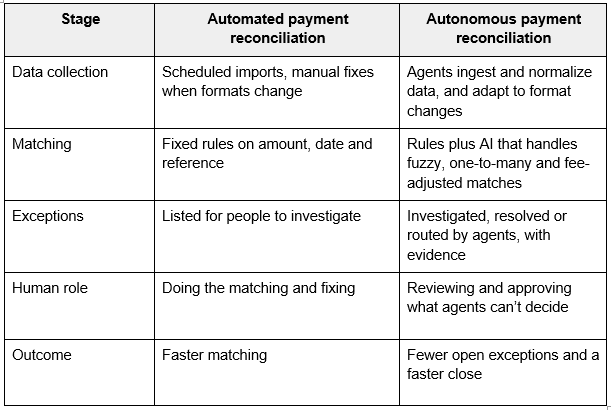
The end result is the same goal every finance team has: books you can trust, fewer exceptions and a faster close. Autonomy simply gets you there with less manual work.
How Does Autonomous Payment Reconciliation Work?
Autonomous platforms split the reconciliation process into steps and give each step to a recon agent. A recon agent is an AI agent that carries out a specific reconciliation task, such as collecting data, matching transactions or resolving exceptions, and records what it did and why.
How well a platform handles each step is what separates basic automation from enterprise-grade autonomous reconciliation.
Data ingestion and normalization
First, agents collect data from every source involved in a payment: bank statements, PSP settlement reports, acquirer files, card network data and ERP or general ledger entries.
Every source sends data in its own format. Dates, currencies, transaction IDs and fee structures rarely line up. A data agent normalizes it into one structure before matching starts, and adjusts when a provider changes its file layout, without anyone rebuilding the import.
Matching by recon agents
Next, recon agents match the records. They combine two approaches:
- Rules-based matching uses conditions you define, such as “match if amount, date and reference ID agree.” It’s predictable and easy to audit.
- AI-driven matching learns from past matches and resolved exceptions. It can match records with no shared ID, grouped settlements (one-to-many and many-to-many) and amounts that differ by a fee.
Rules handle the clean, high-volume majority. AI handles the messy edge cases. Every match carries an explanation, so auditors can see why it was made.
Exception investigation and resolution
This is where autonomous payment reconciliation differs most from basic automation. When a record doesn’t match, an agent doesn’t just flag it. It checks the likely causes (missing settlement, fee difference, duplicate, timing gap or FX variance), gathers the supporting data and either resolves the break within approved limits or sends it to the right owner with the evidence attached.
Each resolved exception teaches the system, so fewer breaks reach your team each month.
Human review and close-ready output
Autonomous does not mean unsupervised. Your team sets the rules, thresholds and approval limits. Anything above a threshold, or anything the agent isn’t confident about, waits for human approval. Once breaks are cleared, the reconciled data flows to the general ledger and the close.
Why Do Enterprise Finance Teams Need Autonomous Payment Reconciliation?
Spreadsheets break down at enterprise scale, and first-generation automation still leaves people working the exception queue. Research by SSON found that 86% of organizations still reconcile in spreadsheets, even with close management platforms in place, and 69% name reconciliations as a major source of manual effort in the close.
That gap costs money in ways that are easy to miss:
- Revenue leakage: missed settlements, duplicate refunds and fee overcharges go unnoticed.
- Slow close: teams spend days investigating breaks instead of analyzing results.
- Audit risk: manual fixes leave weak audit trails.
- Scaling cost: every new PSP, market or entity means more headcount.
Finance leaders want to change this. In a Gartner survey of 155 finance executives, 55% said they were aiming for a touchless financial close and 64% wanted an error-free close. A touchless close isn’t possible if people still investigate every exception, which is why recon agents are becoming the new standard for enterprise reconciliation.
What Features Should You Look for in Automated Payment Reconciliation Software?
These are the features that matter most for an enterprise payment environment. Each one maps to a step of the autonomous reconciliation process above, so you can judge whether a platform only automates matching or can take on exceptions too.
1. Recon agents that combine AI and rules
Ask whether the platform supports both rules-based and AI-driven matching, and whether agents run the work end to end or only suggest matches. Rules should be easy to set up and audit. AI should handle one-to-many and many-to-many matches, fuzzy references and fee-adjusted amounts.
What good looks like: you can see why a match was made, not just that it happened. Explainable matching matters for audits.
Optimus uses AI agents for payment reconciliation, including a Recon Agent that applies N-way fuzzy matching alongside configurable rules.
2. Autonomous exception resolution and routing
Exceptions are where your team spends its time, so this feature has the biggest impact on hours saved. Look for agents that:
- Identify the root cause of each break
- Resolve routine breaks within limits you approve
- Route the rest to the right owner with evidence attached
- Track SLAs, ageing and escalation
Strong exception management in reconciliation turns a pile of breaks into a workflow your team can track and close. Optimus agents autonomously resolve and route exceptions, so people focus on the cases that need judgment.
3. Human-in-the-loop controls and a full audit trail
The more work agents take on, the more your controls matter. Check for:
- Approval thresholds that decide what agents can resolve on their own
- Role-based access and maker-checker approvals
- A complete, unchangeable record of every match, resolution and override, including the agent’s reasoning
- Recognized certifications such as PCI DSS and SOC reports
4. Transaction-level reconciliation
Some tools only reconcile balances, checking that totals agree. That can hide problems inside the totals. A missing $500 refund and an extra $500 charge cancel each other out at balance level.
Transaction-level reconciliation matches each record individually and traces each payment from checkout to settlement to the ledger. Agents need this level of detail to investigate breaks properly.
5. Data ingestion across banks, PSPs and ERPs
Agents are only as good as the data they can reach. Check:
- Which banks, PSPs, acquirers and ERPs have ready-made connectors
- Whether it accepts files (CSV, SFTP), APIs and bank formats
- How it handles changes in data formats without rebuilding imports
Optimus brings in data from ERPs, payment gateways, acquirers, card networks and banks, with 150+ integrations reported, and its Data Fusion Agent prepares that data before matching.
6. Multi-currency and multi-entity support
If you operate in more than one country, check that the platform handles FX conversions and rate differences, settlements in a different currency from the transaction, several legal entities with intercompany matching, and local bank formats and settlement timelines.
7. Scalability for high transaction volumes
Ask vendors for proof that the platform performs at your volume, especially at peaks like holiday sales or month-end. Ask how long it takes to reconcile a day’s transactions at your current volume and at 3x your volume.
8. No-code configuration
Your finance team knows the matching logic and approval limits best. If every new rule or threshold needs a developer or a vendor ticket, changes take weeks.
Ease of use also affects accuracy. Gartner found that companies with high technology acceptance (tools that are easy to use, easy to learn and customizable) see a 75% reduction in financial errors. Optimus is a no-code platform, so finance and operations teams can set up data sources, matching rules and workflows themselves.
9. Real-time reporting and close-ready data
Real-time dashboards show match rates, open exceptions, fee variances and cash positions as they change, instead of weeks later. Look for a platform that passes reconciled data straight into the close. Optimus connects reconciliation to financial close management through its GL and Financial Close agents.
How to Choose an Enterprise Payment Solution for Autonomous Reconciliation
Features are only half the decision. The other half is fit. Before you shortlist any payment reconciliation software, use this four-step approach. Each step checks how much of the reconciliation process the platform can take off your team.
Map your payment flows and data sources
List every way money moves through your business: card payments, bank transfers, wallets, payouts, refunds and chargebacks. Then list every system that holds that data.
Example: a global marketplace might have 4 PSPs, 6 bank accounts, a payout provider and an ERP, which makes 12 data sources the agents need to reach and normalize.
Decide which steps agents should own
Go through the process step by step: data collection, matching, exception investigation, resolution and posting. Decide which steps agents can run on their own, which need approval and what the approval limits are. This tells you how much autonomy you need from a vendor, and stops you paying for automation that still leaves your team working the exception queue.
Set your match, resolution and close-time goals
Decide what success looks like before you talk to vendors. For example:
- Target automated match rate
- Share of exceptions resolved by agents without manual work
- Maximum age of open exceptions
- Target days to close
Clear goals stop demos from steering your decision.
Test the agents on your own data
A demo with sample data proves very little. Ask for a proof of concept on a real month of your data, including your messiest PSP. Check how many breaks the agents resolve, how they explain each decision and how easily your team can review and override them.
How Do You Compare Reconciliation Software Without Overbuying?
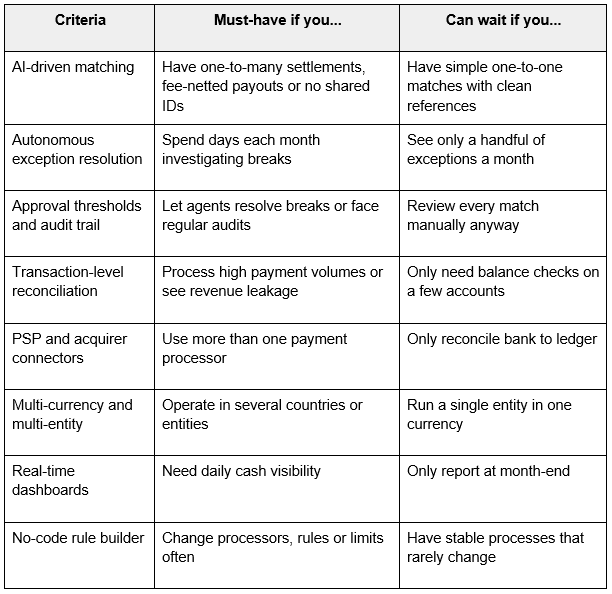
A good reconciliation software comparison starts with your needs, not the vendor’s feature list. Use this table to sort what you need now from what you can add later.
Should You Build or Buy Reconciliation Software?
Some fintechs and large enterprises consider building reconciliation in-house. Recon agents raise the bar, because you would need to build and maintain the AI, the controls and the audit trail as well as the matching.
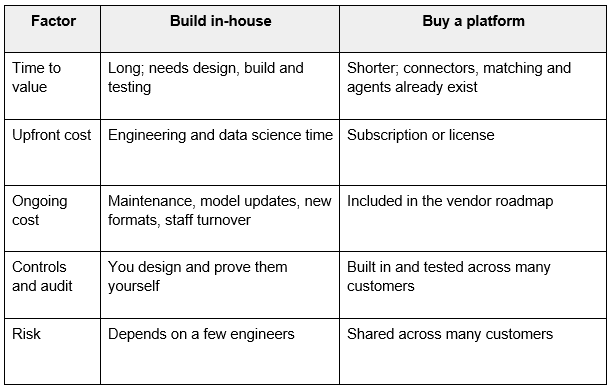
Building can make sense if reconciliation is your core product. For most finance teams, buying is faster and lower-risk.
What Questions Should You Ask a Reconciliation Software Vendor?
Bring these to every demo:
- What automated match rate do customers with a setup like ours usually reach?
- Which steps do your recon agents run on their own, and which need human approval?
- How do agents explain a match or a resolution to an auditor?
- Can we set our own approval thresholds for agent actions?
- Can you run a proof of concept on our own data?
- Which of our PSPs, banks and ERPs have ready-made connectors?
- Can our finance team change rules and limits without developers?
- What security certifications do you hold, and can we see the reports?
- How does pricing change as our volume grows?
What Are the Red Flags When Comparing Reconciliation Software?
Be careful if a vendor:
- Calls rules-based matching “AI agents” without showing what the agents decide
- Can’t explain how its agents make a match or resolve a break
- Lets agents act with no approval limits or audit trail
- Only shows demos with clean sample data
- Needs professional services for every rule change
- Has no connectors for your main PSPs or banks
- Only reconciles balances, not individual transactions
- Any one of these could cost you months later.
What Should Be on Your Reconciliation Software Evaluation Checklist?
Use this checklist to score each vendor:
- Supports rules-based and AI-driven matching
- Uses recon agents to investigate and resolve exceptions
- Lets you set approval thresholds for agent actions
- Keeps a full audit trail, including agent reasoning
- Reconciles at transaction level
- Connects to all your banks, PSPs, acquirers and ERPs
- Handles your currencies and legal entities
- Performs at peak volume, with proof
- Lets finance teams configure rules without code
- Feeds reconciled data into the close
- Completed a proof of concept on your data
- Gives clear pricing as you scale
Move from Automated to Autonomous Payment Reconciliation with Optimus
The right automated payment reconciliation software should match every transaction across your PSPs, banks and ERPs. The best platforms now go further, with recon agents that investigate and resolve exceptions, keep people in control of the decisions that matter and deliver close-ready data.
Optimus brings this together in one no-code platform, with AI agents for data preparation, reconciliation, fee validation, the general ledger and the financial close. Book a demo and see how Optimus agents handle your current reconciliation flow.
Frequently Asked Questions
1. What is the difference between automated and autonomous payment reconciliation?
Ans. Automated payment reconciliation matches transactions using rules and leaves exceptions for people to investigate. Autonomous payment reconciliation uses AI recon agents that also investigate and resolve exceptions within limits you set, and route only the rest to your team.
2. What is a recon agent?
Ans. A recon agent is an AI agent that carries out a reconciliation task, such as matching transactions or resolving exceptions. It works within rules and approval limits set by the finance team and records the reasoning behind every action for audit.
3. Do recon agents replace the finance team?
Ans. No. Agents take on repetitive matching and routine exception work. Finance teams set the rules and thresholds, approve decisions above those limits and spend more time on analysis and judgment calls.
4. How much does automated payment reconciliation software cost?
Ans. It depends on transaction volume, number of data sources, entities and the modules you need. Most enterprise platforms charge a subscription. Compare total cost of ownership, including implementation, support and the manual hours you will save, not just the license fee.
5. How long does reconciliation software take to implement?
Ans. It ranges from a few weeks to a few months. The main factors are how many data sources you connect, how complex your matching rules are and how clean your data is. Platforms with ready-made connectors and no-code setup usually go live faster.


