

BlackLine is built to manage the financial close. It handles account reconciliations, task management, intercompany accounting and consolidation for thousands of finance teams. But if your business moves money through multiple payment service providers (PSPs), banks and marketplaces, you've probably found a gap. The close in BlackLine is only as clean as the transaction data feeding it, and in payments-heavy businesses that data is rarely clean.
You don't have to rip out BlackLine to fix this. Optimus can sit upstream of it, reconciling high-volume payment data at the transaction level before it ever reaches your ledger. This guide explains where BlackLine users typically get stuck, what Optimus adds, and how the two platforms work together.
Why BlackLine Users Get Stuck with High-Volume Payment Data
BlackLine excels at balance-level reconciliation and close governance. The friction usually starts before the close, where millions of payment transactions have to be matched, cleaned and validated.
Transaction volumes have outgrown spreadsheet prep
Payment volumes keep climbing. According to the European Central Bank, the euro area processed 83.5 billion non-cash payments in the second half of 2025 alone, up 6.9% on a year earlier. Globally, the McKinsey Global Payments Report estimates the payments industry generates about .6 trillion in revenue from 3.8 trillion transactions and .1 quadrillion in annual value flows.
When that volume runs through several PSPs, someone has to download settlement files, normalize formats and match transactions before BlackLine can certify the balance. In many teams, that someone is still working in Excel.
Exceptions start upstream, not at the close
For payments-heavy businesses, most reconciliation breaks begin in PSP settlement reports, bank files, chargebacks and processor fees. If that data arrives in BlackLine pre-summarized from spreadsheets, the closure still depends on manual work you can't fully audit.
The close still takes too long
APQC benchmarking puts the median at about six calendar days to complete monthly consolidated financial statements, with the slowest quarter of organizations taking 10 days or more. Close software alone can't shorten that if the transaction data behind each balance is still reconciled by hand.
AI expectations are rising
Finance teams want automation that goes deeper than checklists. A Gartner survey found that 58% of finance functions were using AI in 2024. Among them, 44% apply it to intelligent process automation and 39% to anomaly and error detection. Both use cases depend on transaction-level data that close platforms typically don't hold.
How Optimus Complements BlackLine
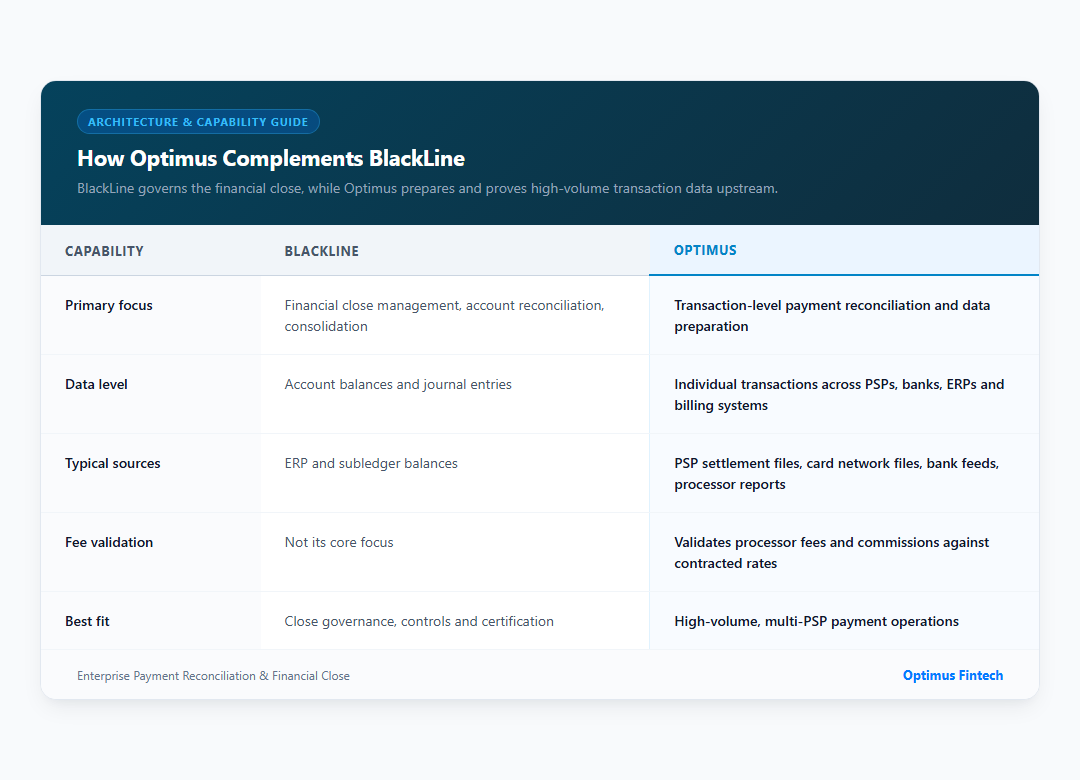
The simplest way to think about it: BlackLine governs the close, and Optimus prepares and proves the transaction data underneath it.
Transaction-level reconciliation before the close
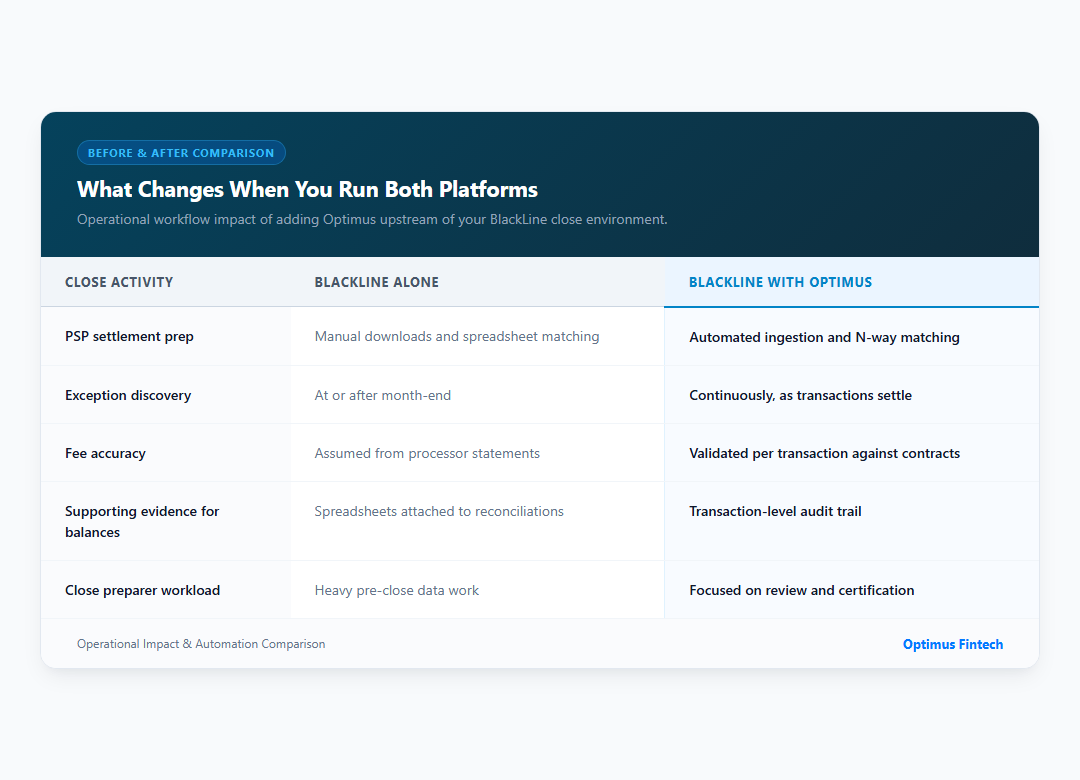
The payment reconciliation platform matches transactions continuously across payment gateways, banks, PSPs, ERPs and internal ledgers using AI-powered and rule-based matching. Exceptions such as missing settlements, unmatched transactions and fee discrepancies are flagged and routed as they happen, not discovered at month-end.
Automated data preparation
The data preparation layer ingests files via API, SFTP or secure upload, then validates and normalizes them into a consistent schema without code. Finance teams stop reformatting settlement files before every reconciliation.
Fee and commission validation
Fees and commissions reconciliation checks every processor charge against your contracted rates. Overcharges, unclaimed rebates and inflated chargeback fees surface at the transaction level, where a balance-level view can't see them.
Clean, ledger-ready outputs
Once transactions are reconciled, ledger reconciliation maps them to GL accounts and produces ERP-ready entries. Those entries flow into your ERP and on to the balance reconciliations you already certify in BlackLine, so close preparers start from verified numbers instead of spreadsheets.
What Changes When You Run Both Platforms
Before and after
Real results from Optimus customers
What Customers Have Achieved
- 90% reduction in time spent on manual processes: T-Mobile's Robert Savage reported a 90% reduction in the time spent on manual processes.
- Payment operations across 36 countries: Tillo connected its payment operations across 36 countries using Optimus.
- Read the T-Mobile case study to see how Optimus helped transform payment operations.
How to Add Optimus to Your BlackLine Ecosystem
- Identify the high-volume reconciliations. List the accounts where BlackLine preparers spend the most time gathering and matching payment data, such as PSP clearing accounts, cash in transit and fee accounts.
- Connect your payment sources. Bring PSP, card network, bank and processor files into Optimus through pre-built integrations.
- Configure matching and fee rules. Set matching criteria, tolerance thresholds and contracted fee schedules without code.
- Map outputs to your GL. Define how reconciled transactions post to your ERP, so the balances BlackLine certifies are backed by transaction-level evidence.
- Run one full close in parallel. Compare results with your existing process before relying on the new flow, and share the parallel-run evidence with your auditors.
- Expand account by account. Once the first reconciliations are stable, move additional payment accounts upstream into Optimus.
Security matters at every step. Optimus stores data in a PCI-DSS certified environment, detailed in the security and compliance overview.
Who Should Use Optimus With BlackLine?
Optimus is particularly relevant for finance teams that:
- Process high payment volumes
- Work with multiple PSPs or payment gateways
- Reconcile bank and processor settlement files
- Manage complex fee structures
- Have significant payment exceptions
- Spend substantial time preparing transaction data before the close
- Need transaction-level audit evidence
When to Complement BlackLine, and When to Rethink It
Complementing BlackLine makes sense when its close and consolidation workflows work well for you, but payment data prep is the bottleneck. This is common in ecommerce, fintech, banking, insurance and retail businesses with multiple PSPs.
If BlackLine's cost, admin overhead or AI add-on pricing is the real problem, a full move may be worth evaluating. Our guide on how to switch from BlackLine to Optimus covers phased migration, parallel runs and controls mapping. Optimus also offers financial close management for teams that want one platform from transaction to close.
Keep BlackLine, Fix What Happens Before the Close
BlackLine gives you control over the close. Optimus gives you confidence in the data underneath it. Together, they turn high-volume payment reconciliation from a month-end scramble into a continuous, auditable process. Your team then spends the close certifying numbers instead of building them.
See how Optimus reconciles every PSP, bank and fee at the transaction level, and feeds clean data into the close you already run in BlackLine. Book a demo to see it with your own payment data.
Frequently Asked Questions
1. Can Optimus work alongside BlackLine?
Yes. Optimus reconciles high-volume payment transactions upstream and produces ERP-ready entries. BlackLine continues to manage close tasks, balance-level account reconciliations and consolidation, so you don't have to replace your close platform.
2. What is the difference between BlackLine and Optimus?
BlackLine focuses on financial close management and balance-level account reconciliation. Optimus focuses on transaction-level payment reconciliation, data preparation and fee validation across PSPs, banks and ERPs. It's built for businesses processing high payment volumes.
3. Why do BlackLine users still reconcile payments in spreadsheets?
PSP settlement files, card network files and processor fee reports arrive in different formats and at different times. Without a transaction-level reconciliation layer, teams match and summarize this data in spreadsheets before attaching it to BlackLine reconciliations.
4. Does Optimus validate payment processing fees?
Yes. Optimus compares every processor fee and commission against your contracted rates and flags overcharges, unclaimed rebates and inflated chargeback fees at the transaction level.
5. Should I replace BlackLine with Optimus?
It depends on your bottleneck. If close governance works but payment data prep is slow, complementing BlackLine with Optimus is usually the faster win. If cost or complexity is the main issue, a phased migration may be worth evaluating.