

Most finance teams don't leave BlackLine because it failed. They leave because the close has changed around it.
Transaction volumes now run through dozens of payment service providers, banks, marketplaces and billing systems. The hard part of the close is no longer ticking off a checklist or certifying a balance. It is proving that millions of underlying transactions, fees and settlements actually tie to the ledger, before day one of close rather than after it.
That shift is why financial close software migration is back on CFO agendas in 2026. This guide walks controllers, finance-systems leads and CFOs through exactly how to switch from BlackLine to Optimus: what to assess, how to sequence the move, how to protect SOX controls during cutover, and when staying put is the better call.
Key takeaways
- A BlackLine migration is a close-process redesign, not a data lift. Teams that copy their old match rules one-for-one rebuild the same bottlenecks on a new platform.
- Optimus approaches close from the transaction up. AI agents unify payment data, reconcile it, map it to the GL and feed a continuous close, rather than starting from period-end account balances.
- The safest path is phased: start with the highest-volume, most exception-heavy reconciliations, run BlackLine and Optimus in parallel for at least one full close, then decommission module by module.
- Contract timing drives the whole plan. Start the readiness work 6 to 9 months before your BlackLine renewal, not 6 weeks.
- Controls and audit evidence must be mapped before go-live, and your external auditor should see the parallel-run results.
Why Finance Teams Are Re-evaluating BlackLine in 2026
BlackLine remains one of the most established close platforms, and it has moved into agentic AI. In April 2026 it launched Agentic Financial Operations, built on its Studio360 data layer and Verity AI agents (Yahoo Finance). So the question in 2026 isn't "does BlackLine have AI?" It's whether its model fits where your close work actually sits.
Four patterns push teams to evaluate a switch:
- The AI layer is a new line item. BlackLine hasn't published pricing for Verity or Studio360, and newer capabilities have historically been licensed as add-ons. In June 2026 investor commentary, BlackLine said customers moving to Studio360 platform pricing see a 10 to 40% uplift in baseline subscription, with consumption-based agent pricing expected to follow. Renewal is when that lands.
- Total cost of ownership is opaque. Third-party contract data puts BlackLine at roughly $77,000 a year on average, ranging from about $17,500 to $340,000, with implementation services adding $5,000 to $50,000 or more (Numeric).
- The close breaks upstream of BlackLine. For payments-heavy businesses such as retail, ecommerce, banks, insurers and marketplaces, most exceptions originate in PSP settlements, bank files, chargebacks and fees. If that data arrives in BlackLine already summarized or pre-cleaned in spreadsheets, the "automated" close still depends on manual prep. This is exactly the gap payment reconciliation software is built to close.
- Admin dependency. BlackLine is built for large, multi-entity organizations that have dedicated finance-systems admins and budget for a multi-month rollout. Leaner teams feel every configuration change.
If two or more of these describe your team, a structured evaluation is worth running before your next renewal.
BlackLine vs Optimus: What Actually Changes When You Switch
The core difference is where each platform starts. BlackLine is organized around the period-end close: reconciliations, journal entries, task checklists and certification on top of your ERP. Optimus is organized around the transaction. It unifies raw payment and financial data first, reconciles it continuously, and hands the close a dataset that is already validated.
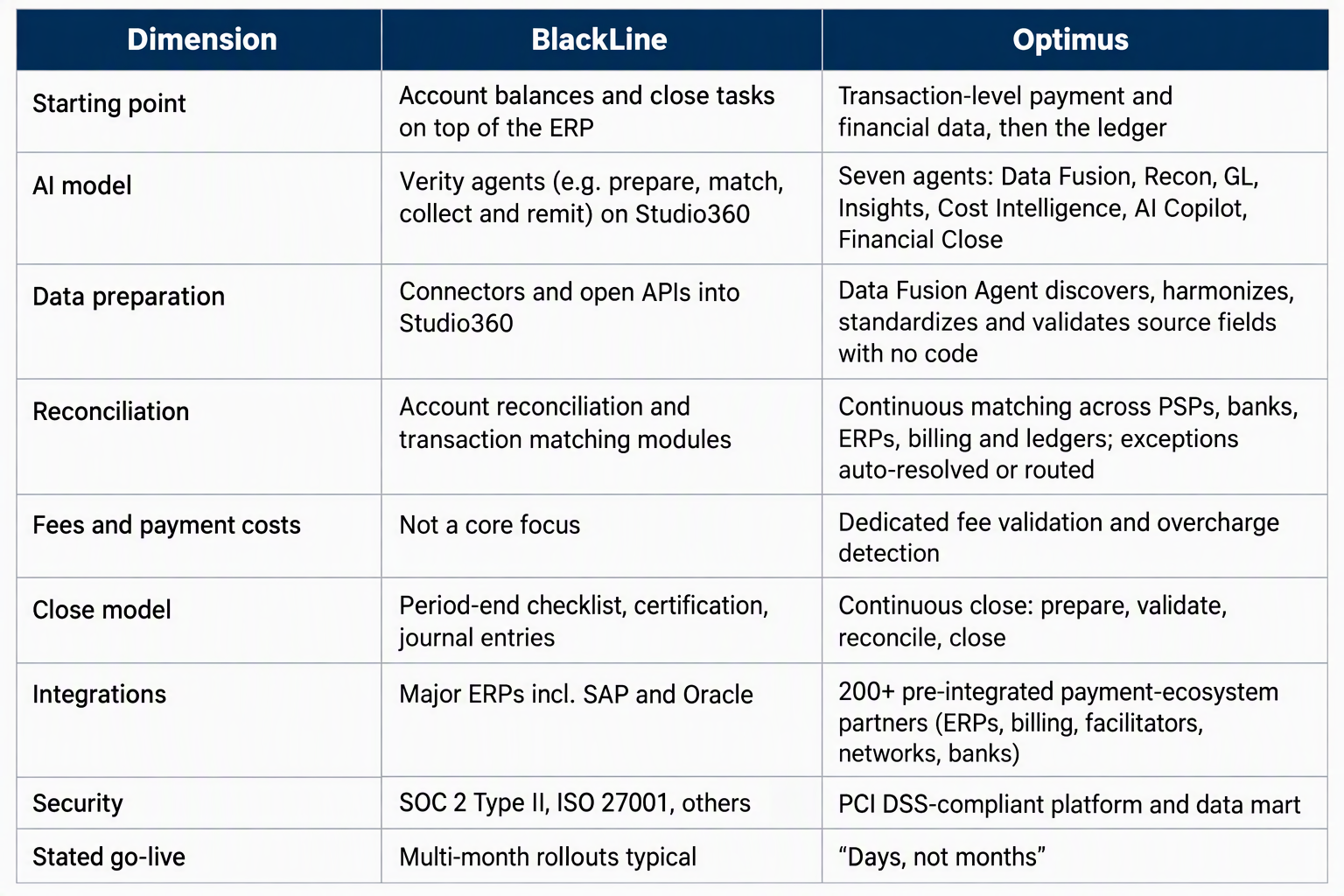
Sources: Optimus, Bluecopa on BlackLine, CFO Shortlist. Vendor-stated go-live claims should be validated against your own scope.
Pre-Migration Readiness Checklist
Complete this inventory before you talk about timelines. It is the single best predictor of whether a financial close software migration lands on schedule.
- Contract position: BlackLine renewal date, notice period, which modules and Verity agents you are licensed for, and data-export terms.
- Reconciliation inventory: every account and transaction reconciliation in BlackLine, with volume, frequency, risk rating, auto-certification rules and average exceptions per close.
- Matching rule library: export all transaction-matching rules and tolerances. Flag rules nobody can explain; they are candidates for retirement, not recreation.
- Data source map: each ERP, bank, PSP, billing system and spreadsheet feeding the close, with file format, frequency and owner.
- Journal entry templates: recurring and automated entries, approval chains and ERP posting logic.
- Close calendar and task list: dependencies, owners and your current day-by-day close timeline (your baseline for measuring success).
- Controls matrix: which SOX or internal controls reference BlackLine evidence, and who signs off.
- Historical data and audit trail: how many periods of reconciliations and supporting documents you must retain, and where they will live.
- Success metrics: agree baseline and target for days-to-close, auto-match rate, open exceptions at close, and hours spent on manual prep.
The BlackLine Migration Guide: Six Phases to an Agentic Close
The sequence below moves risk forward: prove value on the hardest reconciliations first, then migrate the rest once the model is trusted.
Phase 1: Assess and prioritize (weeks 1 to 3)
Use the readiness inventory to score every reconciliation on volume, exception rate and business risk. Pick a first wave of three to five high-volume, exception-heavy processes, typically PSP-to-bank, bank-to-GL and fee reconciliations. These show the fastest measurable gain.
Phase 2: Unify data sources (weeks 2 to 5)
Connect the first-wave sources through Optimus's pre-built connectors. The Data Fusion Agent maps fields and relationships across systems into a common financial model and flags missing data and schema changes. Replace spreadsheet pre-processing here; do not carry it over.
Phase 3: Redesign, don't replicate, matching logic (weeks 4 to 7)
Review exported BlackLine rules alongside the suggestions from Optimus's AI-driven Recon Agent. Keep rules that encode real business logic, drop legacy workarounds, and define exception routing: which breaks auto-resolve, and which go to which team.
Phase 4: Map to the ledger and the close (weeks 6 to 9)
Configure the GL Agent to classify and map reconciled transactions to your chart of accounts and prepare accounting-ready entries for your ERP (SAP, Oracle NetSuite and others). Rebuild close tasks, owners and dashboards in Optimus Financial Close Management.
Phase 5: Parallel run (one to two full closes)
Run both platforms on the same period and reconcile the outputs against each other. Every variance gets a root cause and a sign-off. This is your audit evidence (see the next section).
Phase 6: Cut over and decommission (by module)
Switch the first wave to Optimus as the system of record, archive BlackLine history, then repeat phases 2 to 5 for the next wave. Retire BlackLine modules only when every reconciliation they held has passed a parallel run.
Timelines are indicative for a mid-sized first wave; multi-entity, multi-ERP estates will run longer. Agree the actual plan with the Optimus implementation team against your inventory.
Parallel Run, Cutover and SOX Controls
The parallel run is where a migration earns auditor trust. Treat it as a controls exercise, not a system test.
- Define pass criteria upfront. For example: 100% of balances tie between platforms, every variance above materiality is explained, and auto-match rates meet or beat the BlackLine baseline.
- Re-map controls before go-live. Update your controls matrix so each control that cited BlackLine evidence now cites the equivalent Optimus audit trail, approval workflow or exception log. Review Optimus's security and compliance documentation with your IT audit team.
- Keep humans on judgement calls. Agents should prepare, match and route; reviewers still approve material adjustments and certify high-risk accounts. Document that segregation explicitly.
- Brief your external auditor early. Share the parallel-run plan before the period starts and the variance log after. Surprises at year-end are the real migration risk.
- Preserve history. Export prior-period reconciliations and support from BlackLine in a retrievable format before access ends, and record where they live in your retention policy.
A clean parallel run also gives you the before-and-after numbers (days to close, manual hours, open exceptions) that justify the next migration wave.
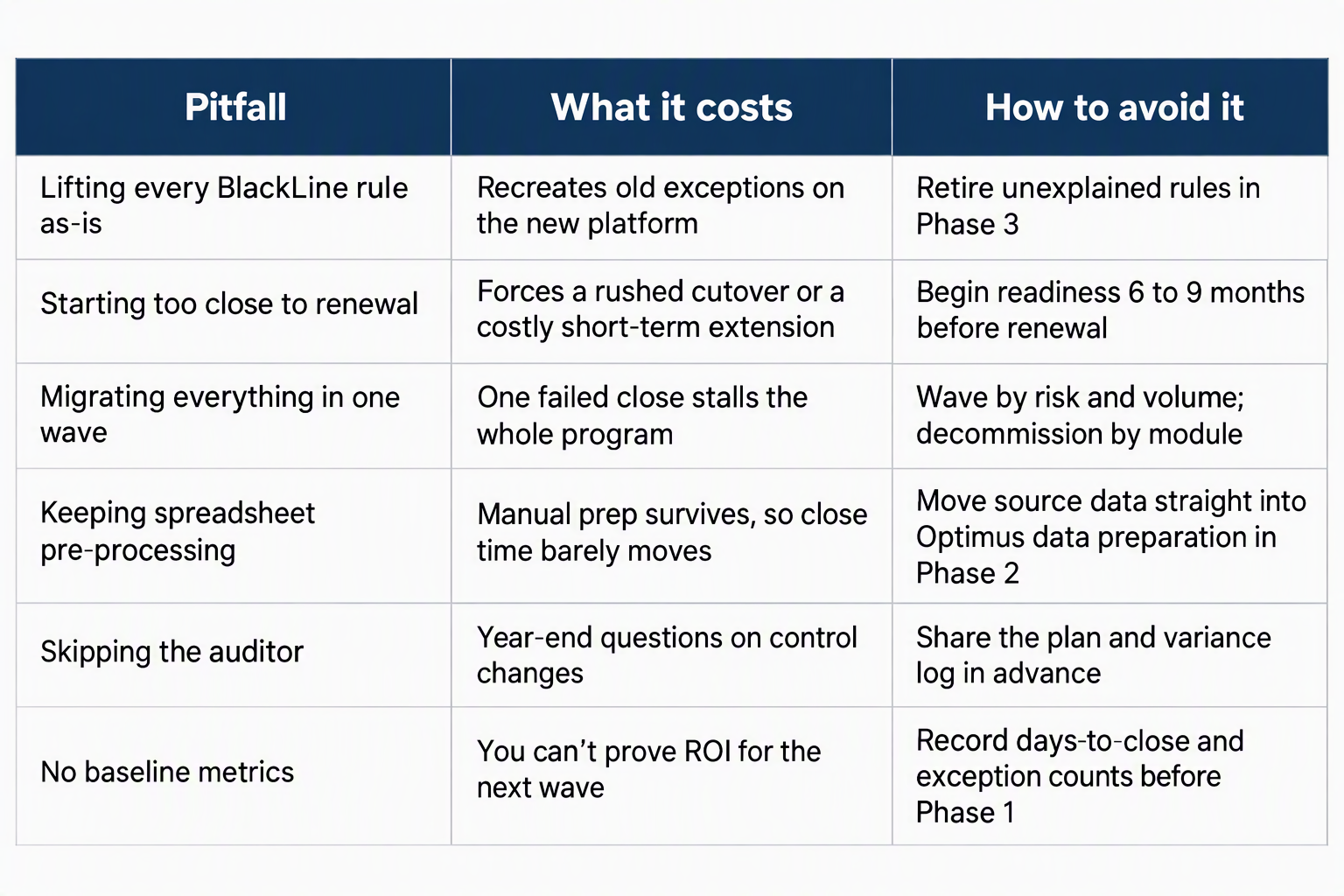
Common Migration Pitfalls
When You Shouldn't Switch (Yet)
Optimus isn't the right move for every BlackLine customer. Stay put, or delay, if:
- Your close pain is mostly consolidation, intercompany or complex multi-GAAP statutory reporting rather than transaction reconciliation. Evaluate those needs separately.
- You have low payment volume and few external data sources, so exceptions are rare and your current setup already works.
- You are mid-ERP migration. Stabilize the ledger first, then move the close.
- Your BlackLine renewal is weeks away with no exit terms negotiated. Negotiate a short extension, then run this plan properly.
A hybrid is also valid: many teams start by moving payment and bank reconciliation to Optimus while BlackLine keeps other close tasks, then consolidate once results are proven. If you're also weighing other close vendors, see our guide to the best Trintech alternatives for agentic account reconciliation.
FAQs
How long does it take to switch from BlackLine to Optimus?
A first wave of three to five high-volume reconciliations typically moves in about two to three months, including a parallel run. Optimus's pre-built integrations let teams go live on connected sources in days; full decommissioning depends on how many entities, ERPs and modules you run.
Can I migrate my BlackLine matching rules?
Yes, export them as the starting point. But treat the export as a review list: keep rules that reflect real business logic and retire legacy workarounds rather than rebuilding them.
What is financial close software migration?
It is the process of moving reconciliations, matching logic, journal workflows, close tasks, controls and historical evidence from one close platform to another without disrupting reporting or audit readiness.
Do I need to run BlackLine and Optimus in parallel?
Yes. Run at least one full close on both platforms, reconcile the outputs, and document every variance. It is the evidence your controllers and auditors will rely on.
What happens to SOX controls during a BlackLine migration?
Controls stay in force; their evidence source changes. Update your controls matrix before cutover so each control points to Optimus audit trails and approvals, and brief your auditor in advance.
Is Optimus a full replacement for BlackLine?
For payment, bank, ledger and fee reconciliation and continuous close, yes. If you rely heavily on consolidation or intercompany modules, assess those separately or run a hybrid first.
What does "agentic financial close" mean?
It means AI agents do the preparation work continuously: unifying data, matching transactions, resolving or routing exceptions and preparing entries. People then review outcomes instead of assembling them at month-end.
Conclusion: Move the Close to Where the Work Starts
A successful financial close software migration isn't measured by how faithfully you recreate BlackLine. It's measured by how much of the close no longer needs a month-end at all. Start with your most exception-heavy reconciliations, prove the result in a parallel run, and let the numbers decide the next wave.
Ready to plan your switch from BlackLine to Optimus? Book a migration assessment and we'll map your current reconciliations, connectors and controls to a phased cutover plan.