
Blog
Financial Reconciliation Software: Fixing Common Reconciliation Errors
Fix reconciliation errors with financial reconciliation software. Improve accuracy, reduce manual work, and scale financ...
Learn how to implement payment reconciliation with accounting software in four steps, plus the features to look for in reconciliation accounting software.

Nov 26, 2026

Your card processor's payout report says $48,210. The bank shows $47,955 two days later, and the ERP holds 1,300 orders that add up to neither. Payment reconciliation with accounting software is the process of matching those three records (PSP settlements, bank deposits and ledger entries) so every payment, fee and refund lands in the right account. Beyond confirming the deposit arrived, it means verifying the transactions behind each payout, separating fees and refunds, and recording the correct amounts in the general ledger. At a few hundred transactions a month, spreadsheets cope. At tens of thousands across several processors, they don't. This guide covers a four-step implementation process, the features to look for in accounting software for reconciliation, and answers to common questions.
Payment reconciliation matches three records, namely what the payment processor settled, what the bank received and what the general ledger recorded.
Manual matching breaks down at volume because processors pay out net of fees, refunds and chargebacks, on different schedules and in different file formats.
Implementation follows four steps, which are connecting your sources, setting matching and GL mapping rules, clearing exceptions, and posting entries with a daily sync.
When comparing reconciliation accounting software, look for ERP integration, broad PSP and bank coverage, one-to-many matching, fee validation and a clean audit trail.
The goal is a small exception queue that the right person can clear before the close.
Payment reconciliation in accounting software is the process of matching transactions across payment processors, bank statements and the ERP or general ledger so that every payment, fee, refund and chargeback is accounted for. A completed reconciliation tells you three things: the customer paid, the processor settled the right amount after the right fees, and the cash reached the bank and the books.
It differs from standard bank reconciliation, which compares the bank statement with the cash account in the ledger. Bank reconciliation can show that a $47,955 deposit arrived. It cannot show which 1,300 orders that deposit covers, or whether the $255 gap is a legitimate processing fee, a refund or an overcharge. Payment reconciliation works at the transaction level, one layer below the deposit.
Most finance teams don't struggle with the idea of reconciliation. They struggle with the data. Four problems show up again and again.
The steps below apply whether you are extending your ERP's built-in tools or adding dedicated reconciliation accounting software alongside it. The order matters: most failed rollouts skip straight to matching rules before the data is clean.
Start with an inventory. List every payment processor, acquirer, wallet and marketplace that collects money for you, every bank account that receives settlements, and every ERP or ledger instance that records them. Teams are often surprised by what turns up: a legacy gateway still processing a few renewals, or a regional entity using a local PSP nobody in head office has looked at.
Next, bring that data into one place. Use APIs where they exist and scheduled file feeds (SFTP, bank statement formats such as BAI2, MT940 or CAMT.053) where they don't. This is where accounting software with seamless bank integration earns its keep: if bank data arrives late or needs manual uploads, every later step inherits the delay.
Finally, normalize. Map each source's fields to a common model: transaction ID, order reference, gross amount, fee, net amount, currency, transaction date, settlement date and transaction type. Once a refund from one processor and a refund from another look the same, they can be matched by the same rules.
Matching rules define when two records are "the same" transaction. Most teams use a hierarchy:
Set tolerances deliberately. A small amount tolerance can absorb FX rounding, and a date window of a few business days covers normal settlement lag. Tolerances that are too loose hide real errors, so document them and have your controller sign off.
Fee rules come next. If your processor contract specifies a rate per transaction type, card scheme or region, encode it, so the system can flag a fee that doesn't match the agreed rate instead of quietly posting it.
Then map every transaction type to the right ledger account: gross sales to revenue or receivables, processing fees to a fee expense account, refunds to a contra-revenue account, chargebacks and their fees to their own accounts, reserves to a receivable from the processor. A clear mapping is what lets you post entries automatically later rather than reclassifying them by hand.
No rule set matches everything. What matters is what happens to the items left over. Group exceptions by cause, since each type has a different fix and a different owner:
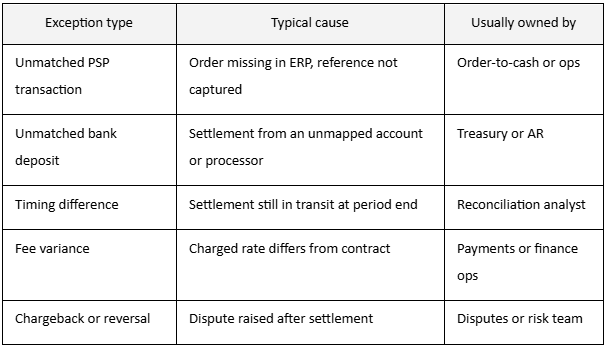
Route each category to its owner automatically, with an ageing view so nothing sits unresolved into the next close. Each resolved exception is also a chance to improve the rules: if the same pattern keeps appearing, write a rule for it. Our payment reconciliation exception taxonomy goes into each category in more depth.
Once transactions are matched and mapped, post the journal entries to the ledger: one summarized entry per settlement batch is common, with fee, refund and chargeback lines split out. Keep a link from each entry back to the underlying transactions so an auditor can drill from the GL line to the order.
Then change the rhythm. Reconciling once a month guarantees a pile-up at month-end. Running the sync and matching daily means exceptions surface while they are still easy to investigate, and month-end becomes a review of a mostly clean position rather than a rebuild.
At close, confirm three balances agree: the PSP's reported settlements for the period, the bank deposits received, and the ledger's cash and clearing accounts. Anything left in clearing should be explained by documented timing differences or open exceptions with an owner.
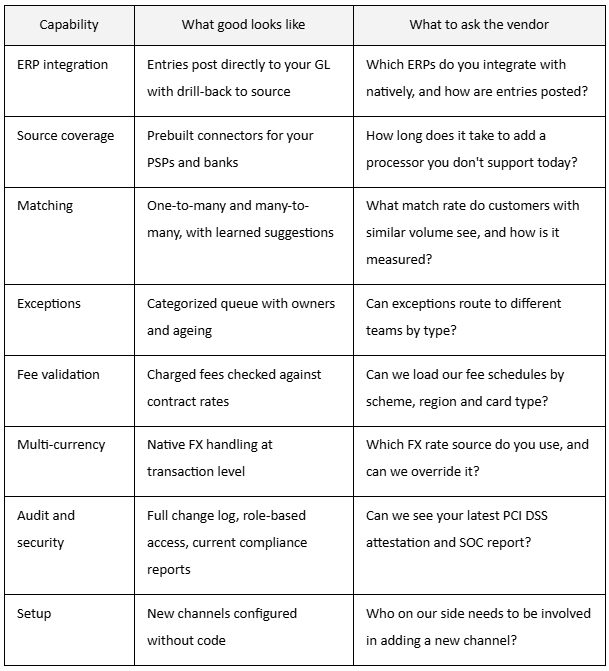
Not every tool labeled "reconciliation" handles payments well. Many were built for bank-to-ledger matching and struggle with processor-level detail. When evaluating accounting software for reconciliation, check for these capabilities.
This is the problem Optimus is built around. Optimus is the AI Canvas for Enterprise Finance Operations, an autonomous payment-to-close platform for banks, payment companies and merchants. Powered by the Finance Ontology, Optimus AI agents reconcile transactions, resolve exceptions, detect payment fee errors and prepare the books for close, with the Financial Close Agent extending reconciliation into the general ledger. The platform supports more than $100B in annual transaction value across more than 3B transactions, and it is SOC 2 Type II audited and PCI DSS Level 1 certified. In a January 2026 press release, global gift card network Tillo announced that it selected Optimus as its payments back-office platform to handle high-volume, multi-market payment operations.
Payment reconciliation usually breaks down on the data, with too many sources, too many formats and too many deductions inside each net settlement. Fix the data layer first, write explicit matching and GL rules, give every exception an owner and run the process daily. Whether you build on your ERP or add dedicated payment reconciliation software, those four habits are what make month-end a review instead of a rebuild.
If your team is still splitting net settlements by hand or chasing unmatched deposits at month-end, it may be time to see a different approach. Optimus connects your payment processors, banks and ERP in one platform, matches transactions automatically and routes exceptions to the right people. Book a demo to see it working on payment flows like yours.
Ans. Connect your payment processors, banks and ERP to a single reconciliation layer through APIs or scheduled file feeds, normalize the data into one format, and define matching rules, fee rules and GL mappings. The software then matches transactions automatically, routes exceptions to the right owner and posts journal entries to the ledger. Running the process daily, rather than at month-end, keeps the exception queue small.
Ans. Yes, if it can ingest and normalize each processor's settlement data. Most general-purpose accounting tools handle bank feeds well but have limited processor-level detail, so businesses with several PSPs often add dedicated reconciliation software that maps every processor's fields to a common model before matching against bank deposits and the ledger.
Ans. ERP reconciliation features usually match bank statement lines against ledger entries. Payment reconciliation software works a level deeper: it breaks net processor settlements into individual transactions, fees, refunds and chargebacks, validates fees against contracts and supports one-to-many matching. The two usually work together, with the reconciliation tool posting summarized, matched entries into the ERP.
Ans. AI improves payment reconciliation by matching transactions that fixed rules miss, such as payments with missing or inconsistent references, partial payments and one-to-many settlements. Models trained on past matches can suggest likely pairs and learn from analyst decisions, which shrinks the manual exception queue over time. Human review remains important for low-confidence matches and for anything that affects the ledger.
Ans. The best payment reconciliation software for an enterprise is the one that covers all its processors and banks, integrates directly with its ERP, handles multiple currencies and entities, validates fees and keeps a full audit trail. Shortlist tools against your own payment stack, then ask vendors to run a proof of concept on a month of your real settlement data before deciding.
More perspectives from our Payment Reconciliation topic collection.
Fix reconciliation errors with financial reconciliation software. Improve accuracy, reduce manual work, and scale financ...

Critical considerations for selecting the right reconciliation product to future-proof accounting and finance operations...

Uncover how to enhance efficiency and eliminate reconciliation delays through streamlined operations, ensuring smooth fi...

1700 Montgomery St, San Francisco, California 94111
6470 E Johns Crossing Suite 160, Johns Creek, GA 30097
Copyright © 2026 Optimus. All Rights Reserved.


